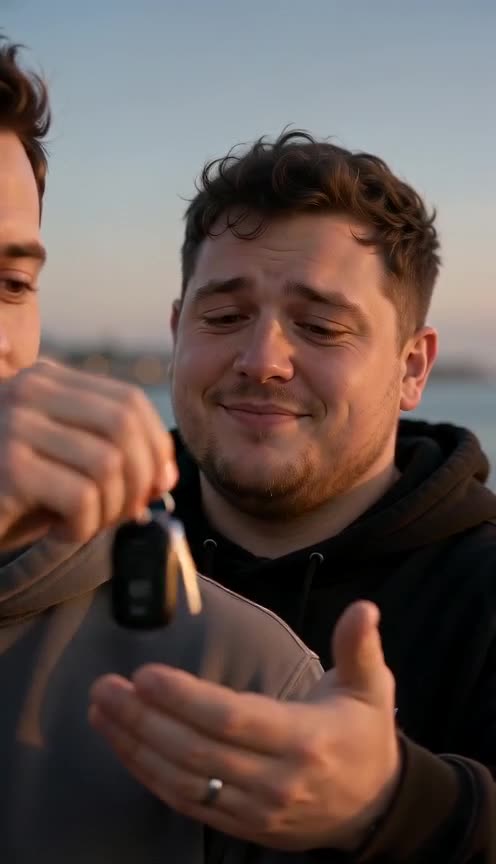
A Never Let Her Pay AI video is a 12 second dinner date sketch with your face: you wave away your date’s card, open your wallet on a yellow and green kitchen sponge, and a smirking waiter walks you to the dirty dishes. You upload one photo and see the price before you pay.
- One photo of you and one fixed five-shot scene, so you type nothing and the price in credits is on the button before you pay.
- The model makes its own sound: restaurant chatter, light lounge music, plates in the kitchen and your single line.
- Adults only: no photos of children, celebrities or other public figures, and label the post as AI.
What is the Never Let Her Pay trend?
It is a short AI-made comedy sketch, also posted as “POV: You never let her pay”. A guest at a smart restaurant refuses to let the date pay, unzips a small wallet and proudly shows the waiter a kitchen sponge instead of a card. The waiter grins and leads the guest straight to the kitchen, where a stack of dirty plates is waiting. The joke turns the line that a real gentleman always pays into the old threat of washing dishes when you cannot cover the bill. Tinydeskai.net, a template site we opened, says the first clip was posted on 8 November 2026 by the TikTok creator @s.nemz with the caption “I got this !”, and that remakes with other faces followed within a day. We have not opened that TikTok post, so the date and the account are that site’s account, not ours. What this site makes is a new generated version, not a copy of any clip.
- 1The offerThe date holds out a card
- 2The refusalYou push it back: “I got this.”
- 3The walletA dish sponge, held up with pride
- 4The billThe waiter walks you to the dishes
What does a Never Let Her Pay AI video look like?
It looks like a warm, phone-filmed restaurant skit at night: dark wood walls, woven rattan lamps glowing amber, small round tables with wine glasses and other diners blurred behind. You sit in a cream blazer over a dark shirt, even if your photo shows a T-shirt, because the outfit belongs to the joke. The date is seen mostly from behind and holds out a plain card to the waiter. You raise a palm, say “I got this”, and the camera drops to your hands unzipping a black wallet on a yellow and green sponge. You hold it up with a serious little nod, the waiter’s smirk fills the frame, and in the last four seconds his hand on your back steers you through a doorway to a steel counter piled with plates. The description asks for no logo, menu or lettering in the room, and for one spoken line only, yours.
Written into every render
Stays the same
- Five shots from the card to the kitchen
- The sponge in a black zip wallet
- One spoken line: “I got this.”
Left to the model
Changes each time
- The faces of the date and the waiter
- How long each shot lasts
- The music under the chatter
How do you make the sponge dinner video from one photo?
Upload one clear photo of yourself, choose 480p or 720p, tick the permission box and press Generate. The button already shows the price in credits, and you sign in and pay only at that step. The AI then makes a new video: your face, skin tone, age, hair and build come from the photo, while the restaurant, the date, the waiter, the sponge and the timing come from a description we wrote once, so there is nothing for you to type. Credits are taken once and go back automatically if the render fails or the provider refuses the photo. Only one render per account runs at a time, and you can close the tab and collect the MP4 later in My videos. A photo in good light, facing the camera, upper body in view, gives the model the least to guess, and a hat or sunglasses can blur who you are.
- 1Add one photo
Yourself, facing the camera, upper body in view.
- 2Choose the quality
The price updates as you choose.
- 3Tick the box and generate
The 9:16 frame is set for TikTok, Reels and Shorts.
- 4Download and post
The MP4 appears on the page and in My videos.
- Your photoOne face, one hairstyle, one build
- A fixed descriptionThe restaurant, the sponge, the waiter and five shots
- The video modelByteDance Seedance, reached through the Kie.ai platform
- Generated soundChatter, lounge music and your one line
What does the sponge dinner video cost, and how long does it take?
There is one length, 12 seconds, because the sketch needs every beat from the card to the dishes; a shorter clip would end before the punchline. It costs 60 credits at 480p and 120 at 720p. Credits are the one unit on this site, a pack of 100 credits is $6.99, and larger packs cost less per credit, so a 480p video costs well under one pack. The page shows an estimated wait before you pay, about 3 minutes at 480p and 5 at 720p, and you can leave while it runs. Our own test render at 12 seconds and 480p took 170 seconds. We have not timed 720p on this template; the figure there comes from our other Seedance trends of the same length. Try your photo at 480p first, then spend on sharpness if you like it. Compare every trend on the pricing page.
How do you post a sponge dinner video without misleading anyone?
Label it as AI, use only a photo of yourself or of an adult who agreed to it, and keep it to personal fun. The sketch is plainly a joke, but a clip of someone being marched to a sink can travel without its context, so say in the caption that it is generated and that no restaurant was harmed. Photos of minors, celebrities and other public figures are not allowed, and the permission box asks you to confirm it each time. Meta labels AI-generated content so viewers can tell, and a plain caption such as AI generated does the same on any feed. Add a trend sound inside the app you post from, under that platform’s rules. For another adult photo sketch, try First Time in a Fancy Cafe or browse all trends.
| Photo of | Allowed | Why |
|---|---|---|
| Yourself, an adult | Yes | The scene is written for one adult |
| An adult who agreed | Yes | The permission box covers it |
| A child, a celebrity or a public figure | No | Not allowed on this site |
Where do these facts come from?
- You Never Let Her Pay, AI comedy video, youneverletherpay.com. A template site whose 11 second demo we watched frame by frame to write our shots.
- Never Let Her Pay AI Video, sponge dinner trend from one photo, tinydeskai.net. Where we read the date and the account the sketch is said to have started from.
- Labeling AI-Generated Images on Facebook, Instagram and Threads, Meta. Why a large platform labels AI-generated content, and how it detects it.
- Seedance, ByteDance Seed. The video model family the renders on this site are made with.
Make your sponge dinner video
Add one photo of yourself and see the price in credits before you generate. A failed render returns its credits automatically.
Make yours